 CarStamp
For iPhone and iPad, also on Mac
Every mile of your car, on the record.
CarStamp keeps itemized service invoices, fuel and charging, and reminders for inspection, insurance, registration or road tax and servicing, and shows what each mile or km really costs. One history, ready for the next owner. Free for one car, with no account and no ads.
Coming soon to theApp Store
See what’s freePrivate: no account, no ads, no data collected.
Moving from Fuelio, Drivvo, Fuelly, aCar or Road Trip? Bring your history over, free, with no column mapping.

What CarStamp keeps
Itemized services
Parts and labor line by line, as on the invoice, scanned or typed.
Fuel and charging
Gasoline, diesel, LPG, CNG, hydrogen or kWh, even gasoline and LPG in one car, in any currency. Fuel use is worked out for each fuel.
Maintenance and renewals
The factory plan, inspection, insurance and registration or road tax, reminded by date or distance.
A buyer-ready history
A file to hand over when you sell, and with Pro a service history PDF to share or print.
Upcoming
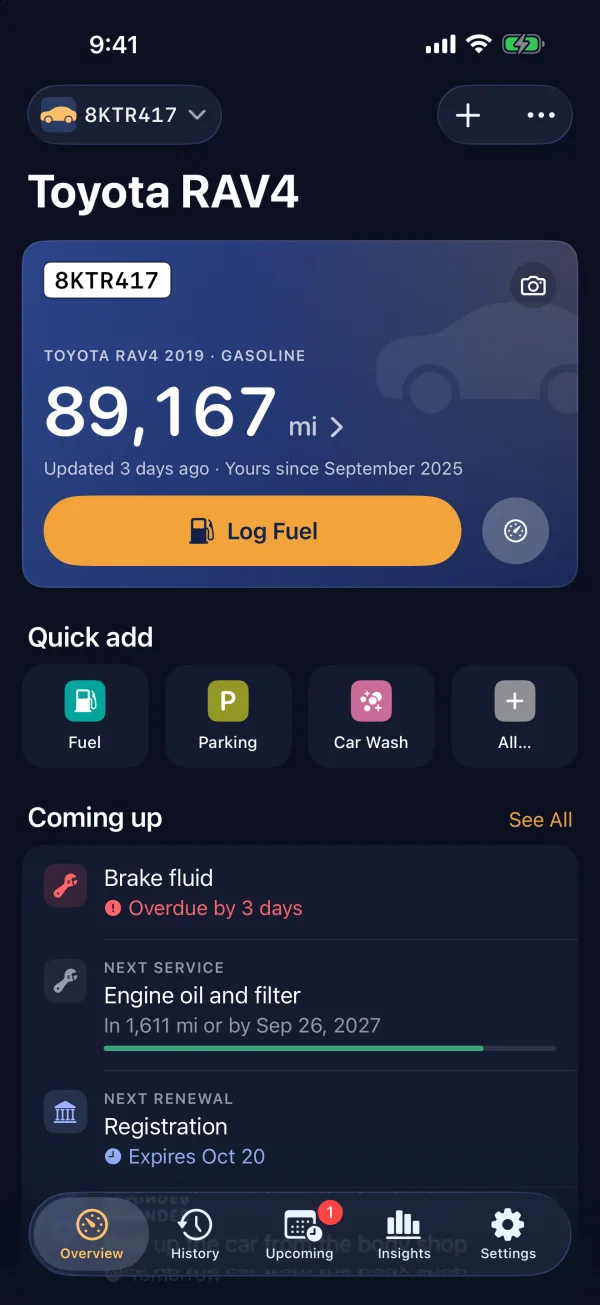
Know what is due next.
Maintenance by date or distance, inspection, insurance and registration or road tax, with a reminder before each one and how many days or miles are left. Mark it done straight from the notification.
Services
Every invoice, line by line.
Parts with their brand, part number and where you bought them, labor and the workshop, as on the invoice, or marked as done yourself. A warranty repair at zero cost still belongs in the history.
Service history PDF
A history a buyer can trust.
Every service with its parts, part numbers and labor, the maintenance plan and the renewals, in one PDF with your name and the receipts attached. Share it with a buyer or a workshop, save it or print it. With Pro.
Documents
Papers with their expiry dates.
Expiry dates and reminders for your registration, insurance and license. Page photos: one document with up to 2 pages free, every document with Pro.
Insights
What the car really costs.
Spending for this year and last, the monthly chart, cost per mile and average fuel use, all free. Pro adds per-tank detail, price history, a forecast and the change against the last period.
iPad
Room for the whole picture on iPad.
Overview and Insights beside the sidebar, with every figure on one screen.
Real screens, sample data.
Mac
Also on your Mac.
CarStamp runs on Mac too. With Pro, iCloud sync keeps your devices in step; without it, each device keeps its own data and a backup file moves it.
Also on Apple Vision Pro
CarStamp opens as a window in your space, with the same Overview.
Free and Pro
Free for one car, for good.
Keeping one car’s full record is free: every record, reminder and document date, backup and Hand Over to New Owner. Pro adds more cars, sync, detailed Insights and the service history PDF.
| Feature | Free | Pro |
|---|---|---|
| Active cars | 1 car | Unlimited |
| Unlimited records and every reminderRecords and reminders | Included | Included |
| Insights | Basic | Detailed |
| Receipt reading | 10 reads | Unlimited |
| Document pages | 1 document, up to 2 pages1 document, 2 pages | Unlimited |
| Photos and files on recordsPhotos and files | Photo of a scan, first 10 readsScan photo, first 10 | Included |
| Service history PDF to share, save or printService history PDF | Not included | Included |
| iCloud sync between your devicesiCloud sync | Not included | Included |
| Home Screen and Lock Screen widgetsWidgets | Not included | Included |
| Part and workshop history, tire sets, Calendar sync, app iconsTires, parts, calendar, icons | Not included | Included |
Compare everything
| Feature | Free | Pro |
|---|---|---|
| Your cars | ||
| Active cars | 1 car | Unlimited |
| Sold cars, with all their records (they don’t count toward the limit)Sold cars, records kept | Included | Included |
| New records on a sold car | Not included | Included |
| Records and logging | ||
| Unlimited records: fuel, charging, services, expenses, mileageUnlimited records of every kind | Included | Included |
| Quick actions on the app icon | Included | Included |
| Scan the odometer with the camera (iPhone and iPad)Odometer scan | Included | Included |
| Siri, Shortcuts and Control CenterSiri and Shortcuts | Not included | Included |
| Import from Fuelio, Drivvo, Fuelly, aCar, Road Trip and CSVImport from other apps, CSV | Included | Included |
| Backup, restore and CSV export | Included | Included |
| Hand Over to New Owner | Included | Included |
| Service history PDF to share, save or printService history PDF | Not included | Included |
| Reminders | ||
| Maintenance and renewals, with every alertMaintenance and renewal alerts | Included | Included |
| Renewals paid in parts, with a reminder for each paymentRenewals paid in parts | Not included | Included |
| Insights | ||
| Spending, cost per mile and fuel useSpending, cost per mile, fuel use | Included | Included |
| Fuel detail, driving, depreciation, forecast, compare cars, change against the last periodDetailed insights, forecast | Not included | Included |
| Receipts and documents | ||
| Receipt reading | 10 reads | Unlimited |
| Photos and files on records | Photo of a scan, first 10 readsScan photo, first 10 | Included |
| Document expiry dates and remindersDocument expiry reminders | Included | Included |
| Document pages | 1 document, up to 2 pages1 document, 2 pages | Unlimited |
| Sync and devices | ||
| Apps for iPhone, iPad, Mac and Apple Vision ProiPhone, iPad, Mac, Vision Pro | Included | Included |
| iCloud sync between your devicesiCloud sync | Not included | Included |
| Extras | ||
| Home Screen and Lock Screen widgetsWidgets | Not included | Included |
| Part and workshop history | Not included | Included |
| Tire sets | Not included | Included |
| Calendar sync | Not included | Included |
| Alternate app icons | Not included | Included |
Monthly, yearly or a one-time Lifetime purchase. The App Store shows the price in your country.
If Pro ends, nothing is deleted: every car keeps its records and alerts.
Pro works with Family Sharing. New subscribers can try the yearly plan free for 14 days.
Your car’s history is yours.
No account, no ads, no data collected. Your cars and records stay on your device and, if you turn on sync, in your own iCloud. The developer never sees them. Purchases go through Apple.
Read the privacy policy- No account
- No ads
- No data collected
- Purchases through Apple
Questions
What is CarStamp?
CarStamp is an app for iPhone, iPad, Mac and Apple Vision Pro that keeps a complete record of your car: fuel and charging, services and parts, expenses, mileage, maintenance and renewals such as insurance, technical inspection, vignette and road tax, with reminders before each one is due. It works for motorcycles and vans too.
Is CarStamp free?
Yes. CarStamp is free for one car, for good, with unlimited records, every reminder, basic insights, backup, CSV export and Hand Over to New Owner. CarStamp Pro is optional and is sold as a monthly or yearly subscription or a one-time lifetime purchase. Prices vary by country and are shown in the App Store.
Which devices does CarStamp run on?
CarStamp runs on iPhone and iPad with iOS and iPadOS 18 or later, on Mac with macOS 15 or later, and on Apple Vision Pro with visionOS 2 or later. Without Pro each device keeps its own data and a backup file moves it between them; with Pro your data syncs through your own iCloud.
Does CarStamp work in my country?
Yes. CarStamp works in any country: distances in miles or kilometers, fuel in gallons or liters, fuel use in mpg or L/100 km, and any currency. When you add a car, it suggests the usual renewals (insurance, inspection, registration, road tax or a vignette) for 30 countries, including the U.S., the U.K., Canada and Australia, and a general set everywhere else. You can add your own too.
Does CarStamp collect my data or need an account?
No. CarStamp needs no account, shows no ads and collects no data. Your records stay on your devices, and with Pro they sync through your own iCloud account. The App Store privacy label is Data Not Collected.
Can I move my data from Fuelio, Drivvo, Fuelly, aCar or Road Trip?
Yes. CarStamp imports the files Fuelio, Drivvo, Fuelly, aCar and Road Trip export, without mapping columns, and any CSV file. Importing is free.
More answers, from backups to restoring purchases, are on the Support page.
| Devices | iPhone, iPad, Mac, Apple Vision Pro |
|---|---|
| Requires | iOS and iPadOS 18, macOS 15, visionOS 2 or later |
| Price | Free for one car, for good |
| CarStamp Pro | Optional: monthly, yearly or one-time lifetime; price set per country in the App Store |
| Sync | Through your own iCloud, with Pro |
| Import from | Fuelio, Drivvo, Fuelly, aCar, Road Trip, CSV |
| Account | None |
| Data collected | None |
| Works in | Any country, in miles or km and any currency |
| Languages | English, Bulgarian |
CarStamp is coming to the App Store.
For iPhone, iPad, Mac and Apple Vision Pro. Free for one car.
Coming soon to theApp Store